COMPLEX WORKFLOW · DESIGN EXERCISE
Simulation
Training Platform
An instructor interface for setting up a military simulation exercise, from choosing the scenario to launching it on the trainees’ screens.
A structured interface for selecting scenarios, assigning participants and configuring a simulation environment.


SCOPE
UX · Information Architecture · UI Design · Interactive Prototype
CONTENT
Instructor Interface for Military Training
PROJECT
Product Design Exercise
ROLE
UX/UI Designer
Before an exercise starts, the instructor picks a scenario, allocates simulators, assigns people and configures each simulator. Every decision depends on an earlier one, so the interface has to show at all times what is complete, what is missing and what needs attention.
Turning a complex setup into a clear operational flow.
The brief
12
LED wall simulator
soldiers at most per wall, each configured individually.
2–4
Vehicle simulator
people per vehicle, in roles such as driver, gunner and commander, plus vehicle settings.
4
Settings per soldier
Helmet, primary weapon, secondary weapon and a heart-rate sensor.
➜
Judged on
Structure, clarity of the flow, ease of navigation and the operator’s speed.
The brief
Turning a complex setup into a clear operational flow.
Before an exercise starts, the instructor picks a scenario, allocates simulators, assigns people and configures each simulator. Every decision depends on an earlier one, so the interface has to show at all times what is complete, what is missing and what needs attention.
2–4
Vehicle simulator
people per vehicle, in roles such as driver, gunner and commander, plus vehicle settings.
12
LED wall simulator
soldiers at most per wall, each configured individually.
4
Settings per soldier
Helmet, primary weapon, secondary weapon and a heart-rate sensor.
➜
Judged on
Structure, clarity of the flow, ease of navigation and the operator’s speed.

Where becomes the readiness strip. Only the simulators switched on, each with its own status.
The steps become the stepper. A step opens only once the ones before it are valid.
Who and How fill it in. Each simulator turns ready as its people and settings are complete.


Who
03 Assign
The crews and soldiers in them.
Where
02 Simulators
The vehicles and LED walls that run it.
What
01 Scenario
The map the exercise runs on.
How
04 Configure
Their equipment and settings.
I defined these four steps in my original concept, before any AI-assisted work. The final prototype is built on exactly this structure.
My UX structure
Key decisions
Each step shows what its decision depends on.


Vehicle simulator
A map, not a picture.
Start point, objectives and terrain are what an instructor compares. The map shows them directly; the engine render stays one click away.

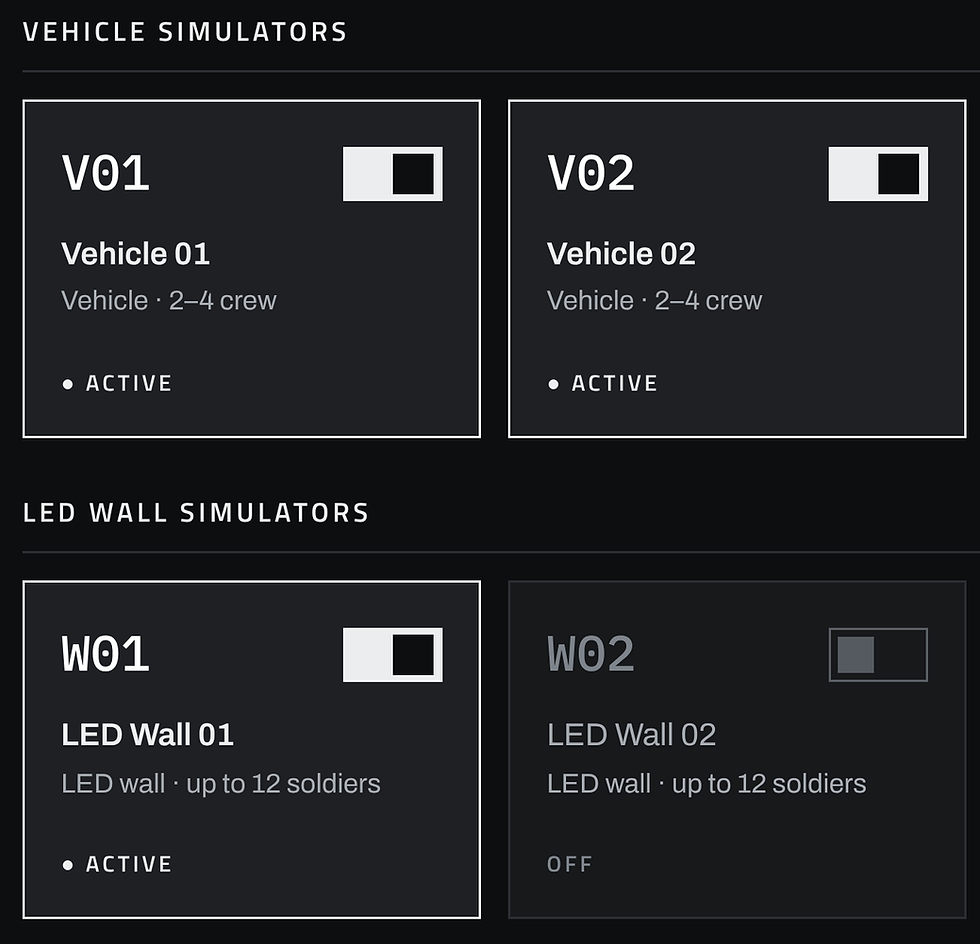
Vehicle simulator
Only what runs continues.
Switching off a crewed simulator asks first, because it removes those assignments.
Seats, not dropdowns.
Who · Assign
A vehicle is drawn as its crew stations. Capacity is visible before anything is read, and the docked personnel list fills whichever seat is selected.
One soldier, one seat. Assigned people show where they sit and can be moved, never double-booked. A prototype assumption.

Capacity
2 to 4 crew, as the brief defines. The amber mark is the minimum.


The readiness strip is also how the instructor moves between simulators.

Ready

Incomplete
How · Configure
Shared settings. Individual exceptions.
Every LED wall soldier needs all four settings. A finished loadout can be applied to the rest: the scope is named first, and Undo follows.
The wall counts as configured only when every soldier on it is set.


The prototype
From interface concept to stateful prototype.
A change upstream reaches only what depends on it. Readiness drops where it must. Everything else the instructor entered stays.
Change
The crew changes
Affected
→ Vehicle confirmation becomes invalid
Kept
→ Vehicle settings stay intact
Next
→ Instructor reviews and reconfirms
Change
A soldier joins an LED wall
Affected
→ That soldier needs a loadout
Kept
→ Vehicle settings stay intact
Next
→ Instructor reviews and reconfirms
Change
A crewed simulator is switched off
Affected
→ Its assignments are removed
Kept
→ Other simulators stay as they are
Next
→ Asked first, never silent
→ Asked first, never silent
→ Other simulators stay as they are
→ Its assignments are removed
A crewed simulator is switched off
→ Instructor reviews and reconfirms
→ Vehicle settings stay intact
→ That soldier needs a loadout
A soldier joins an LED wall
→ Instructor reviews and reconfirms
→ Vehicle settings stay intact
→ Vehicle confirmation becomes invalid
The crew changes
Kept
Affected
Change
Next
→ Asked first, never silent
→ Other simulators stay as they are
→ Its assignments are removed
A crewed simulator is switched off
→ Instructor reviews and reconfirms
→ Vehicle settings stay intact
→ That soldier needs a loadout
A soldier joins an LED wall
→ Instructor reviews and reconfirms
→ Vehicle settings stay intact
→ Vehicle confirmation becomes invalid
The crew changes
Kept
Affected
Next
Change
The crew changes
→ Instructor reviews and reconfirms
→ Vehicle confirmation becomes invalid
→ Vehicle settings stay intact
A change upstream reaches only what depends on it. Readiness drops where it must. Everything else the instructor entered stays.
From interface concept to stateful prototype.
The prototype
Affected
Affected
Defaults are not readiness.
Explicit confirmation
A vehicle opens with sensible settings already selected. It counts as configured only after the instructor has reviewed and confirmed them.

Defaults are loaded. The strip still asks for confirmation.

Unconfirmed
01

Confirmed
02


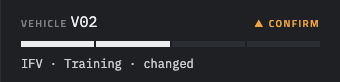
Settings or crew changed
03
The confirmation goes, the settings stay. The instructor checks what changed and confirms again. Until every vehicle is confirmed, the exercise can’t start.
Reconfirm
04

Defaults are loaded. The strip still asks for confirmation.
Unconfirmed
01


Confirmed
02


Exercise running: the scenario is loaded on every listed simulator.

Review and launch
One last look, then go.
Start opens a single review sheet. Confirm start is the only red action on it.

Embed area: full content width, at least 820 px tall.
Personnel, scenarios and equipment are placeholder data.
Process
I built the prototype in Claude Design, an AI-assisted design and prototyping tool. It sped up the work on edge cases, states, visual options and the build itself. The decisions stayed mine: I checked assumptions against the brief, rejected what it didn’t support, tested the flow and fixed the logic gaps QA uncovered.
Prototype assumptions, marked in the prototype: one soldier per seat, at least one soldier per LED wall, illustrative data.
DESIGN SUMMARY
Different content.
A shared language.
A commercial template designed around customer choice, with reusable structures and visual rules that give those choices a coherent foundation.
The design connects a staged setup, simulator-specific assignments and local editing controls within one interface structure.
DESIGN SUMMARY
The design connects a staged setup, simulator-specific assignments and local editing controls within one interface structure.